How to share your Valorant collection
Updated September 23, 2026
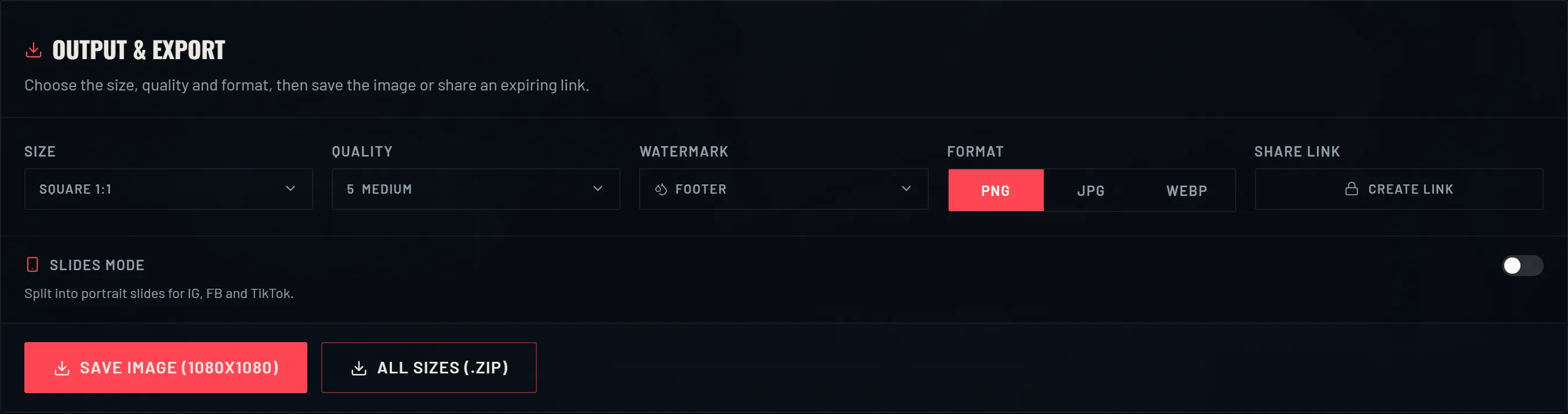
How you share a collection depends on where it's going. One PNG is perfect for Discord or a feed post. A set of 9:16 slides is what TikTok, Reels and Shorts want. A zip gets you every size at once. And a share link lets someone open your card in their browser without you sending a file. Here's what each one is for, and how the link expiry works.
What you can export
VALODEX saves the preview at whatever size you picked. PNG is the sharpest and the best default. JPG and WEBP are smaller and totally fine for chat. The image always matches the preview, so you know what you're getting before you save.
If you want the same card in a few shapes, All sizes (.zip) saves every size preset in one download. Use it when you want a square for a feed and a 9:16 for a story without doing it twice.
Slides for TikTok, Reels and Shorts
Short-video apps want a tall image, and a big collection doesn't fit in one without shrinking every skin to nothing. Slides mode fixes that: it splits your collection across a few 9:16 frames, and each one is readable on a phone.
Set how many skins go on each slide. Fewer per slide is easier to read in a video. More per slide is fine if people can zoom in. Page through the slides in the builder, then export them all as a zip in order.
- 01Turn on Slides mode in the output panel.
- 02Pick the 9:16 preset if it isn't already.
- 03Set skins per slide, then page through the preview.
- 04Export All slides (.zip) and drop them into your editor, or post them in order.
Where each one works best
Discord and most chat apps are happiest with one PNG at a reasonable size, because they shrink anything bigger. For a server showcase, a square with tier icons on is the version people actually stop and read.
Feeds like 4:5, since it takes up more room than a square without getting cropped. Stories and short videos want 9:16, either one card or a few slides. Banners and wallpapers are what the wide presets are for, and they're not really meant for feeds.
Three things to check before you post
Look at it at the size other people will actually see. Zoom the export down to about the width of a chat bubble and try to read the skin names. If you can't, cut the collection down or turn on slides so fewer skins share a frame.
Make sure the details are right. The rank on the card is the one you picked, not what the game knows, so a wrong rank is easy to spot. Same with the player card and sprays — only what you selected shows up.
Think about what you're putting out there. An image only has what's on the card. A share link goes a bit further, since it carries your collection behind an expiring URL. If you wouldn't want a stranger to screenshot it, send an image instead, or only send the link to people you trust for the day it lasts.
Share links, and how they expire
A share link opens your card in a read-only view. The other person doesn't need a file and doesn't need to install anything. You make it from the output panel, but only after you've imported a Riot account. That's on purpose: the link carries a signed copy of your collection, and the signature comes from the import, which stops anyone from making a link that pretends to be your account.
Links last 24 hours. The payload is encrypted, sits on the server for that day, then it's gone. Open an expired one and you get a notice instead of a broken page. Shared views also stay out of search results, both on the page and in robots.txt, because a snapshot of someone's collection really doesn't belong in Google.
- 01Import your Riot account so the builder can sign the link.
- 02Open the output panel and hit Create link.
- 03Copy the URL and send it. It works for 24 hours.
- 04Whoever opens it sees a read-only version of the card you shared.
What the other person sees
A shared view is read-only on purpose. They can look at the card, switch templates to see other looks, and save their own copy. They can't edit your collection or send changes back to you. Nothing in the link exposes your Riot password, your tokens, or anything beyond the items you chose to put on the card.
If you'd rather not use a hosted link at all, just export an image. It's a file, it never expires, and it works anywhere an image does. The link is just handy when you want the card to stay interactive.
Frequently asked questions
- How long does a VALODEX share link last?
- 24 hours. The encrypted payload is stored for a day and then deleted. After that the link shows a notice instead of the card.
- Why is the Create link button greyed out?
- Links are signed, and the signature comes from a Riot import. Add or import a Riot account and the button unlocks.
- What's the best format for TikTok?
- 9:16, exported through Slides mode, so a long collection gets split into frames people can actually read.
- Can I share without importing a Riot account?
- Yes. Making a card and saving an image never needs an import. Only the hosted share link does, because it has to be signed by the account it belongs to.
- Can someone edit my collection through a share link?
- No. Shared views are read-only. They can preview templates and save their own copy, but they can't change yours.
Keep reading
- How to view your Valorant skin collectionWhy the game has no full skin list, and how to see everything you own.
- How to make a Valorant inventory cardThe whole walkthrough: import your skins, pick a layout, save a card you can post.
- How to organize your Valorant skin collectionSorting, bundle merging and display toggles that make a big collection readable.
- How much is your Valorant collection worth?How collection value is added up, and why the game never shows you a total.
- Valorant skin prices: what skins cost in VPWhat skins cost by tier, and why the price you paid can differ from the list.
- Valorant card sizes for social mediaThe right export size for every place you post a collection card.
Choosing a look? Compare every template side by side.