
How to view your Valorant skin collection
Updated September 23, 2026
Short version: Valorant has no single screen that shows every skin you own. Open the Collection tab and you get one gun at a time, so you can check each weapon but never see the whole thing in one list. Want the full picture? You either click through the Collection tab gun by gun, or you pull the same owned-skins info the game uses and look at it somewhere else.
What the game actually shows you
Open Collection and you get a grid for one weapon. Pick a gun and you see the skins you own for it, plus the ones you don't. It works fine, but it's one gun at a time, and you can't sort it, add it up, or share it.
The game also never tells you what your collection is worth. Prices only show up in the store while an item is on sale, and your VP balance is just your balance. Nothing adds up the skins you already have.
- 01Open Valorant and go to Collection.
- 02Pick a weapon.
- 03You'll see the skins you own, with locked ones greyed out.
- 04Do that for every gun to see the whole thing.
Why there's no full list in the game
When you buy or unlock a skin, Riot adds it to your account for good. Every time you play, the game asks Riot what you own and unlocks those skins for you.
The game only ever needs to answer one question: for this gun, which skins can I use? It never needed a big sortable list you could export, so there isn't one.
So where does the data live?
It's there, just not in the game's menus. Riot has an API that can tell your account which skins, player cards, sprays and buddies it owns.
To use it you need a token tied to your account. Riot's own login sends you to playvalorant.com, then back to a URL that has a short-lived access token, an id token, and your PUUID in it. That's the same thing collection trackers use, and it's what VALODEX uses when you import your Riot account. It's a read, nothing more.
The token is the whole story here. It expires after a few hours, it can only read what Riot allows, and it stops working once it's dead. Any tool you use should handle it in your browser and never ship it off to a server you don't own.
Your options
Three ways people do this. First is the slow way: click through the Collection tab gun by gun. No third party, no login, just tedious.
Second is a tracker or collection site that lets you sign in with Riot and shows one big list. Great for a count, but that's usually where it ends. No layout, nothing to customize, nothing to post.
Third is to grab the list and actually do something with it. That's what VALODEX is for: it reads the same data during the Riot import, builds your collection, and turns it into a card you can style and save. The list is the start; the card is the point.
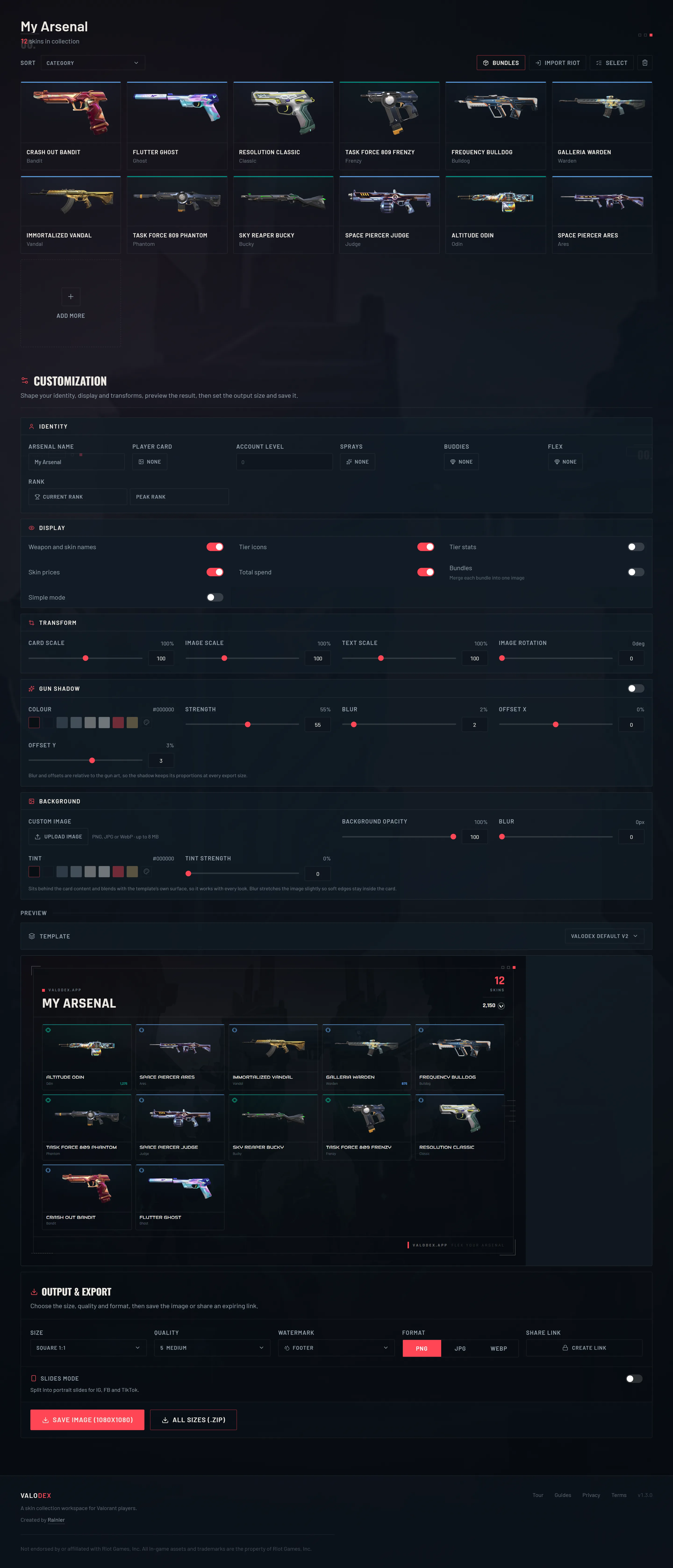
Seeing your full list in VALODEX
The import is optional. The app works without it, but it's the fastest way to get everything in one place.
- 01Go to valodex.app/create.
- 02Click Import from a Riot account.
- 03Sign in on Riot's page, then copy the URL it sends you to.
- 04Paste that URL into the box. It stays in your browser and talks to Riot directly.
- 05Your skins, player card, sprays, buddies, flex, level and rank show up in the grid.
Before you log into anything
If a Riot sign-in link doesn't end on a Riot domain, close it. Your password goes on Riot's page and nowhere else, and no real tool needs it. That access URL is a temporary key, not a login. If a tool keeps it and won't say why, that's on them, not you.
It's also worth knowing what this can't do. Reading your account shows what you own. It can't spend VP, change anything, or unlock skins. Riot has rules for third-party apps, and the honest version is that read-only tools like this have been around for years and Riot has never officially said yes or no. Don't hand over your password and you're fine.
Frequently asked questions
- Can I see my skins without signing in anywhere?
- Yes, but it's slow. The in-game Collection tab is the only Riot-made view, and it's one gun at a time. Anything that shows everything in one list has to read your account, and that means signing in.
- Can using a third-party tool get me banned?
- Reading your own account through Riot's login doesn't change your account or the game, and tools like this have been used for years. Riot has never officially supported them, so it's your call. Don't share your password and don't use anything that asks for it.
- Why doesn't the game show what my collection is worth?
- Prices only exist in the store for stuff that's on sale. Once you own a skin it's just yours, so the game has no reason to price it. VALODEX adds up store prices to give you a rough total, which is why it's an estimate, not an official number.
- Can I look at skins I don't own?
- Yep. VALODEX has a full skin browser that's separate from your collection, so you can look up any skin and add it if you want.
Keep reading
- How to make a Valorant inventory cardThe whole walkthrough: import your skins, pick a layout, save a card you can post.
- How to share your Valorant collectionPNG, slides and zip exports, plus how the expiring share links work.
- How to organize your Valorant skin collectionSorting, bundle merging and display toggles that make a big collection readable.
- How much is your Valorant collection worth?How collection value is added up, and why the game never shows you a total.
- Valorant skin prices: what skins cost in VPWhat skins cost by tier, and why the price you paid can differ from the list.
- Valorant card sizes for social mediaThe right export size for every place you post a collection card.
Choosing a look? Compare every template side by side.